Dans les articles précédents, nous avons vu comment utiliser Magisk, exploré le contenu d’une mise à jour Android puis l’on s’est fait une idée de la démarche suivie par Magisk pour fournir des droits root à une application arbitraire.
On sait que rooter un téléphone avec Magisk implique une modification d’une partition (init_boot dans notre cas).
Mais comment l’application Magisk réalise-t-elle ces modifications ?
Modification de l’init_boot.img par Magisk
Lorsque l’on patche l’image init_boot.img avec Magisk, les messages suivants sont affichés :
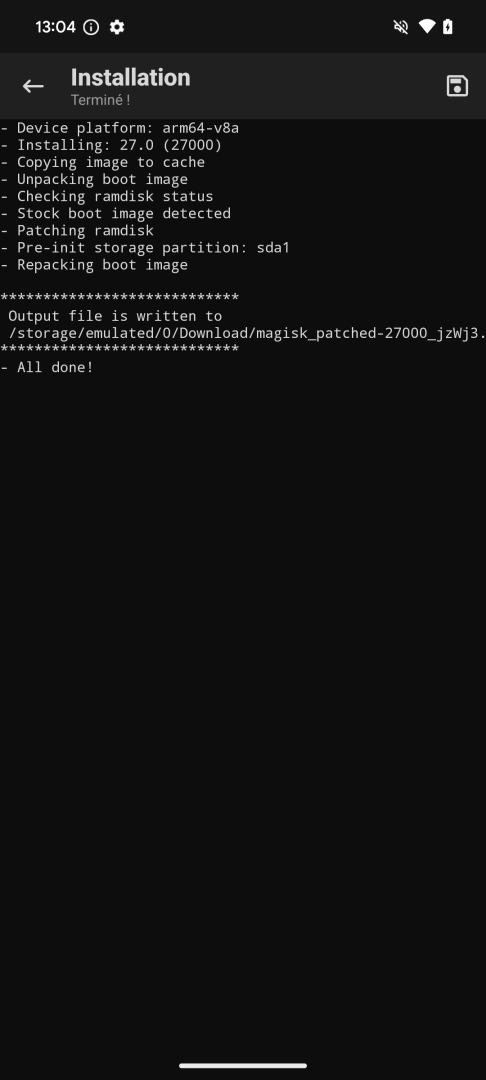
Partons de ces messages pour débobiner la pelote de laine.
Les deux seules occurrences du message « Unpacking boot image » se trouvent dans les scripts boot_patch.sh et uninstaller.sh.
Ce dernier ne contient toutefois pas le message « Repacking boot image », contrairement à boot_patch.sh, si bien que c’est le script boot_patch.sh qui va nous intéresser.
Notons que ce script commence par un commentaire récapitulant les rôles des différents utilitaires Magisk, ce qui est tout à fait appréciable :
# File name          Type      Description
#
# boot_patch.sh      script    A script to patch boot image for Magisk.
#                  (this file) The script will use files in its same
#                              directory to complete the patching process.
# util_functions.sh  script    A script which hosts all functions required
#                              for this script to work properly.
# magiskinit         binary    The binary to replace /init.
# magisk             binary    The magisk binary.
# magiskboot         binary    A tool to manipulate boot images.
# init-ld            binary    The library that will be LD_PRELOAD of /init
# stub.apk           binary    The stub Magisk app to embed into ramdisk.
# chromeos           folder    This folder includes the utility and keys to sign
#                  (optional)  chromeos boot images. Only used for Pixel C.
Notons d’abord que le premier argument, $1, est le chemin du fichier à patcher :
BOOTIMAGE="$1"
[ -e "$BOOTIMAGE" ] || abort "$BOOTIMAGE does not exist!"
On unpack ensuite le bootimage avec magiskboot :
#########
# Unpack
#########

CHROMEOS=false

ui_print "- Unpacking boot image"
./magiskboot unpack "$BOOTIMAGE"
Le commentaire ci-dessus nous dit que magiskboot est un « tool to manipulate boot images ». Mais encore ?
Regardons le help de magiskboot pour avoir des précisions. Le texte pondu par magiskboot help étant assez long, nous ne retiendrons que la liste des commandes proposées :
unpack bootimg: extrait les différents composant du fichierbootimgrepack origbootimg outbootimg: recréé un fichieroutbootimgà partir des éléments deorigbootimgverify bootimg: vérifie la signature debootimg, retourne 0 (succès) ou 1 (échec)sign bootimg: signebootimgextract payload.bin partition outfile: extrait la partitionpartitiondu fichierpayload.bin, dans le fichieroutfilehexpatch file hexpattern1 hexpattern2: recherche le motifhexpattern1dansfileet le remplace parhexpattern2cpio incpio commands: exécute la sequence de commandes cpiocommandssur le fichierincpiodtb file action: réalise des actions en lien avec le dtb, ie le device tree blobsplit file: splitte un fichier .dtbcompress=format infile outfile: compresse un fichierdecompress infil outfile: décompresse un fichier
La commande magiskboot unpack "$BOOTIMAGE" réalise donc l’extraction de l’init_boot.img…comme le commentaire le laissait penser.
Que ce passe-t-il dans la suite du script ?
Si un fichier ramdisk.cpio est présent, le script teste sa décompression avec magiskboot cpio ramdisk.cpio test :
###################
# Ramdisk Restores
###################

# Test patch status and do restore
ui_print "- Checking ramdisk status"
if [ -e ramdisk.cpio ]; then
  ./magiskboot cpio ramdisk.cpio test
  STATUS=$?
  SKIP_BACKUP=""
else
  # Stock A only legacy SAR, or some Android 13 GKIs
  STATUS=0
  SKIP_BACKUP="#"
fi
La valeur de retour de cette commande est soit 0 (cas nominal), soit 1 (ramdisk.cpio patché avec Magisk), soit 2 (format non supporté), soit 4 (ramdisk.cpio Sony).
Dans le cas normal, l’init_boot.img est copié dans stock_boot.img et le ramdisk.cpio est copié dans ramdisk.cpio.orig.
case $STATUS in
  0 )
    # Stock boot
    ui_print "- Stock boot image detected"
    SHA1=$(./magiskboot sha1 "$BOOTIMAGE" 2>/dev/null)
    cat $BOOTIMAGE > stock_boot.img
    cp -af ramdisk.cpio ramdisk.cpio.orig 2>/dev/null
    ;;
le cas d’un ramdisk.cpio patché avec Magisk, est géré différemment :
  1 )
    # Magisk patched
    ui_print "- Magisk patched boot image detected"
    ./magiskboot cpio ramdisk.cpio \
    "extract .backup/.magisk config.orig" \
    "restore"
    cp -af ramdisk.cpio ramdisk.cpio.orig
    rm -f stock_boot.img
    ;;
enfin en cas d’echec l’exécution s’arrête :
  2 )
    # Unsupported
    ui_print "! Boot image patched by unsupported programs"
    abort "! Please restore back to stock boot image"
    ;;
esac
Durant l’étape suivante, le script compresse les fichiers magisk, stub.apk et init-ld :
#################
# Ramdisk Patches
##################

ui_print "- Patching ramdisk"

$BOOTMODE && [ -z "$PREINITDEVICE" ] && PREINITDEVICE=$(./magisk --preinit-device)

# Compress to save precious ramdisk space
./magiskboot compress=xz magisk magisk.xz
./magiskboot compress=xz stub.apk stub.xz
./magiskboot compress=xz init-ld init-ld.xz
Un fichier config contenant divers éléments de configuration est créé :
echo "KEEPVERITY=$KEEPVERITY" > config
echo "KEEPFORCEENCRYPT=$KEEPFORCEENCRYPT" >> config
echo "RECOVERYMODE=$RECOVERYMODE" >> config
if [ -n "$PREINITDEVICE" ]; then
  ui_print "- Pre-init storage partition: $PREINITDEVICE"
  echo "PREINITDEVICE=$PREINITDEVICE" >> config
fi
[ -n "$SHA1" ] && echo "SHA1=$SHA1" >> config
Ensuite, le ramdisk.cpio est patché :
./magiskboot cpio ramdisk.cpio \
"add 0750 init magiskinit" \
"mkdir 0750 overlay.d" \
"mkdir 0750 overlay.d/sbin" \
"add 0644 overlay.d/sbin/magisk.xz magisk.xz" \
"add 0644 overlay.d/sbin/stub.xz stub.xz" \
"add 0644 overlay.d/sbin/init-ld.xz init-ld.xz" \
"patch" \
"$SKIP_BACKUP backup ramdisk.cpio.orig" \
"mkdir 000 .backup" \
"add 000 .backup/.magisk config" \
|| abort "! Unable to patch ramdisk"

rm -f ramdisk.cpio.orig config *.xz
Dans l’étape suivante, fstab est patché :
#################
# Binary Patches
#################

for dt in dtb kernel_dtb extra; do
  if [ -f $dt ]; then
    if ! ./magiskboot dtb $dt test; then
      ui_print "! Boot image $dt was patched by old (unsupported) Magisk"
      abort "! Please try again with *unpatched* boot image"
    fi
    if ./magiskboot dtb $dt patch; then
      ui_print "- Patch fstab in boot image $dt"
    fi
  fi
done
Lorsqu’un noyau est présent dans le fichier fourni (ce qui n’est pas le cas avec un init_boot.img), celui-ci est patché si nécessaire :
if [ -f kernel ]; then
  PATCHEDKERNEL=false
  # Remove Samsung RKP
  ./magiskboot hexpatch kernel \
  49010054011440B93FA00F71E9000054010840B93FA00F7189000054001840B91FA00F7188010054 \
  A1020054011440B93FA00F7140020054010840B93FA00F71E0010054001840B91FA00F7181010054 \
  && PATCHEDKERNEL=true

  # Remove Samsung defex
  # Before: [mov w2, #-221]   (-__NR_execve)
  # After:  [mov w2, #-32768]
  ./magiskboot hexpatch kernel 821B8012 E2FF8F12 && PATCHEDKERNEL=true

  # Disable Samsung PROCA
  # proca_config -> proca_magisk
  ./magiskboot hexpatch kernel \
  70726F63615F636F6E66696700 \
  70726F63615F6D616769736B00 \
  && PATCHEDKERNEL=true

  # Force kernel to load rootfs for legacy SAR devices
  # skip_initramfs -> want_initramfs
  $LEGACYSAR && ./magiskboot hexpatch kernel \
  736B69705F696E697472616D667300 \
  77616E745F696E697472616D667300 \
  && PATCHEDKERNEL=true

  # If the kernel doesn't need to be patched at all,
  # keep raw kernel to avoid bootloops on some weird devices
  $PATCHEDKERNEL || rm -f kernel
fi
Enfin l’init_boot.img est reconstruit avec le ramdisk modifié :
#################
# Repack & Flash
#################

ui_print "- Repacking boot image"
./magiskboot repack "$BOOTIMAGE" || abort "! Unable to repack boot image"

# Sign chromeos boot
$CHROMEOS && sign_chromeos

# Restore the original boot partition path
[ -e "$BOOTNAND" ] && BOOTIMAGE="$BOOTNAND"

# Reset any error code
true
Conclusions
Le script boot_patch.sh lancé par l’application Magisk modifie l’init_boot.img :
- Ajout de l’init sauce Magisk
- Ajout d’un répertoire overlay.d contenant notamment magisk.xz, stub.xz